MOSS-Image: specs, settings, VRAM and text rendering tested
MOSS-Image is a 5B text-to-image model from OpenMOSS, released on 16 October 2026 under Apache-2.0. It's built for images with a lot of text in them, such as posters, infographics, slides and UI, and it accepts a JSON layout with bounding boxes as the prompt. On an H100 it takes 17.4 seconds and 29 GiB for a 1024 × 1024 image at the default 50 steps.
What OpenMOSS released
There are two checkpoints. MOSS-Image-Base is the pretrained model, with no post-training and no distillation of settings like CFG, and OpenMOSS points LoRA training at it. MOSS-Image-SFT is fine-tuned from Base on curated data and is the one to generate with. Both use the same architecture and pipeline.
It's text-to-image only. The paper lists reference images and editing as future work. Comfy's repackaged weights include a separate edit LoRA, which OpenMOSS doesn't document.
Support arrived the same day in diffusers (as a custom pipeline), ComfyUI, vLLM-Omni and SGLang. Both serving integrations sat on unmerged branches at launch, so check their pages before relying on them.
Architecture and specs
| MOSS-Image | |
|---|---|
| Type | Single-stream diffusion transformer, trained from scratch |
| Parameters | 5B, counting the DiT only |
| Layers | 42 joint blocks, hidden size 3072, 24 heads of 128, FFN 8192 |
| Text encoder | Qwen3.5-9B, frozen; final-layer states go through a projection and two text-only blocks |
| VAE | FLUX.2 VAE, 32 latent channels, 8x downsampling |
| Tokens | 2x2 latent patches, so one token covers 16 x 16 pixels; 4,096 image tokens at 1024² |
| Prompt length | Up to 4,096 text tokens |
| Text languages | English best; Chinese supported |
| Licence | Apache-2.0, weights and code |
The 9B text encoder is almost twice the size of the generator. In bf16 the DiT is about 10 GB and the encoder about 19 GB, which is why the model needs more VRAM than "5B" suggests.
Recommended settings
The model cards and the repo give the same defaults:
- Steps: 50, flow-matching Euler, shift 5.
- Guidance: CFG 3. The user guide suggests 3 to 6, with 3 usually enough for long prompts and higher values for short ones.
- Skip-layer guidance: layer 22 is skipped in the negative branch by default (
uncond_skip_layers=[22]). The guide warns that turning it off can make details collapse. - Negative prompt: empty for SFT. For Base the guide suggests
nsfw, worst quality, bad anatomy, watermark, jpeg artifact. - Size: about 1, 1.5 or 2 megapixels, any aspect ratio, sides in multiples of 16. It extrapolates from 512² up to 2048².
Each step runs the transformer twice (conditional and unconditional), so 50 steps means 100 forward passes. That's the main reason it's slow next to distilled models.
import torchfrom diffusers import DiffusionPipelinepipe = DiffusionPipeline.from_pretrained( "OpenMOSS-Team/MOSS-Image-SFT", custom_pipeline="pipeline_moss_image", trust_remote_code=True, torch_dtype={"default": torch.bfloat16, "vae": torch.float32},)pipe.scheduler = type(pipe.scheduler).from_config(pipe.scheduler.config)pipe.to("cuda")image = pipe( 'A chalkboard cafe menu: "Today\'s Specials", "Flat white 3.80", "Oat latte 4.20"', height=1024, width=1024, num_inference_steps=50, guidance_scale=3.0, uncond_skip_layers=[22], generator=torch.Generator("cpu").manual_seed(42),).images[0]image.save("menu.png")JSON layout prompts
Besides plain text, MOSS-Image takes a JSON layout as the prompt string. A summary describes the whole image, and each entry in items is a piece of text or an object with its own caption and a bounding box. OpenMOSS calls the format experimental. This is the example from the user guide:
{ "summary": { "meta": ["poster"], "canvas": "single", "caption": "A minimalist travel poster with a cream background, a blue mountain illustration, and the title EXPLORE at the top." }, "items": [ { "label": "text", "caption": "Large dark-blue uppercase title centered at the top.", "text": "EXPLORE", "bbox": [-416, -384, -288, 384] }, { "label": "object", "caption": "A flat blue mountain illustration in the lower center.", "bbox": [-192, -288, 384, 288] } ], "bbox_coord_space": "abs_centralized", "bbox_format": "yxyx"}bbox_format: "yxyx"means[y_min, x_min, y_max, x_max].abs_centralizedmeans pixel coordinates with the origin at the centre of the canvas, so a 1024 × 1024 image runs from -512 to 512 on both axes.- Pass it with
json.dumps(layout, ensure_ascii=False)and setwidthandheightto the canvas the boxes assume. - For line breaks inside a text item, use
\n. Automatic wrapping doesn't always land where you'd want.
The repo includes a prompt-enhancer skill that converts top-left xyxy drafts into this format, which is easier to write by hand. In the paper's human-preference test of prompting strategies, JSON layouts ranked first and short one-line requests last.
Speed and VRAM on an H100
We ran MOSS-Image-SFT and Z-Image Turbo on a single H100 80GB SXM: bf16, everything resident on the GPU, diffusers 0.43, PyTorch 2.9, no compilation, one warm-up image per model. Times are per image, batch 1.
| Model | Settings | Size | Seconds per image | Peak VRAM (allocated) |
|---|---|---|---|---|
| MOSS-Image-SFT | 50 steps, CFG 3 | 1024 × 1024 | 17.4 | 29.0 GiB |
| MOSS-Image-SFT | 50 steps, CFG 3 | 1456 × 1456 | 38.7 | 32.6 GiB |
| Z-Image Turbo | 9 steps, no CFG | 1024 × 1024 | 1.6 | 21.7 GiB |
Our 1024² figure matches a separate community benchmark that measured 17.1 seconds on an H100 SXM and about 28 GB of GPU memory. The same test put an RTX 4090 at 47 seconds, which on that card requires a quantised text encoder or offloading.
The README quotes 3.65 GiB of peak GPU memory. That number uses the low-memory mode, which keeps the DiT in system RAM and loads the encoder and VAE from disk as needed, and it costs 14 GiB of system RAM and a lot of speed. With everything on the GPU, plan on about 29 GiB at 1024².
Running it on smaller GPUs
Comfy's repackaged weights include INT8 versions of both the DiT and the text encoder, plus a w4a8 encoder. With the text encoder at 8-bit or 4-bit, the full pipeline fits in 18 to 22 GB on the GPU. One tester ran SFT at INT8 on a 12 GB RTX 3060 in about 82 seconds per 1024² image at 50 steps.
Community step distills cut that sharply. Testers report about 8 seconds on the 3060 with an 8-step DMD LoRA, keeping the 50-step composition. On an H100, 4-step LoRAs come in around 2 seconds. Text quality held up at 4 steps in one OCR test and dropped at 3, and other testers saw spelling errors on titles with fast distills. None of these come from OpenMOSS, which says its own few-step distillation is in progress.
Text rendering: a 10-prompt test
The headline claim is long in-image text. On the authors' own LongLongTextBench, with targets averaging 1,340 characters, MOSS-Image scores 96.3 against 40.8 for Z-Image Base and 64.9 for Qwen-Image-2512. On the older LongTextBench, which the authors call close to saturation, it scores 97.6, which places it among the leading open models rather than above them. We haven't seen an independent run of either benchmark.
Our test is much smaller: 10 prompts at 1024², seed 42, the same prompts for both models. Nine contain text (a poster, chalkboard menu, shop sign, infographic, product label, slide, Chinese sticky note, a four-sentence notice and a login screen), and one is a photo with no text.
| MOSS-Image-SFT (50 steps) | Z-Image Turbo (9 steps) | |
|---|---|---|
| All requested text correct | 9 of 9 | 7 of 9 |
| Errors | Added an unrequested, garbled subtitle under the infographic title | Doubled a character in the Chinese note (点点); repeated the step numbers on the infographic |
| Long notice (4 sentences) | Correct, line breaks follow sentences | Correct, set as one block |
| Small text (label, window sign) | Correct | Correct |
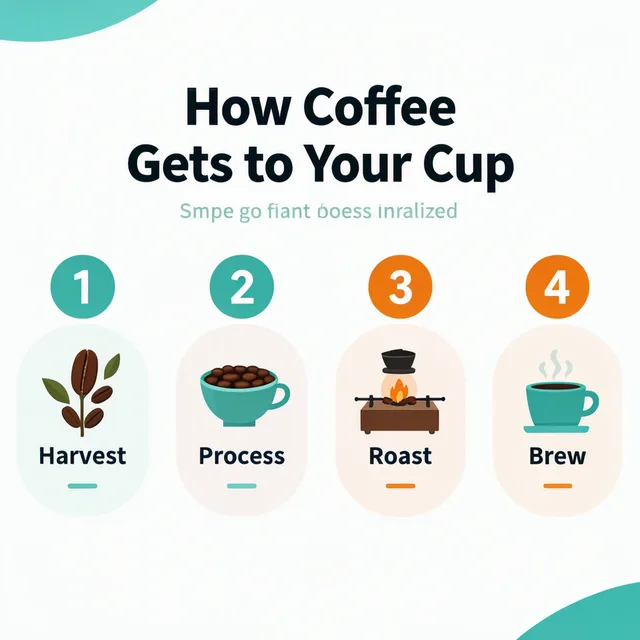
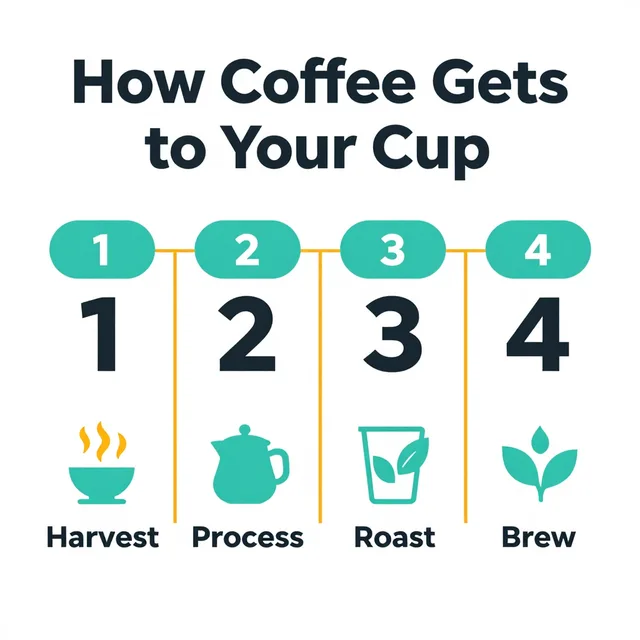
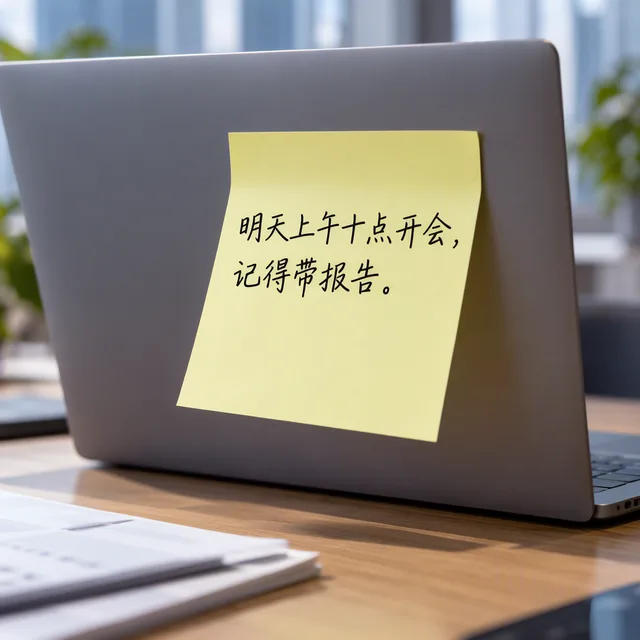
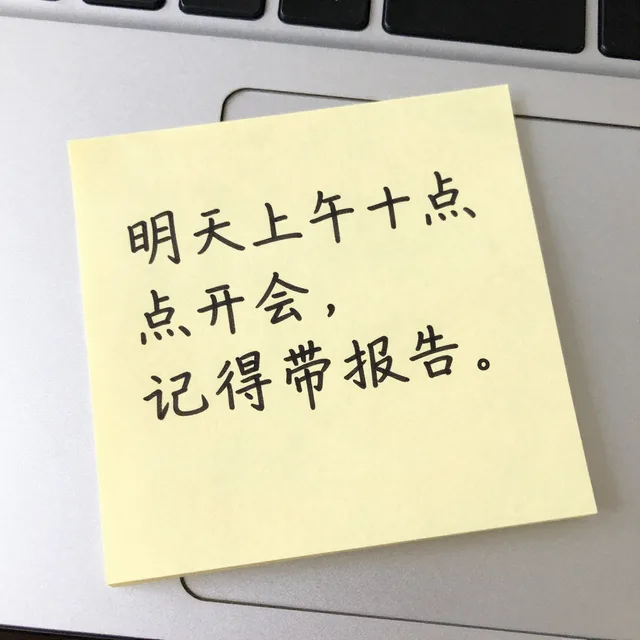
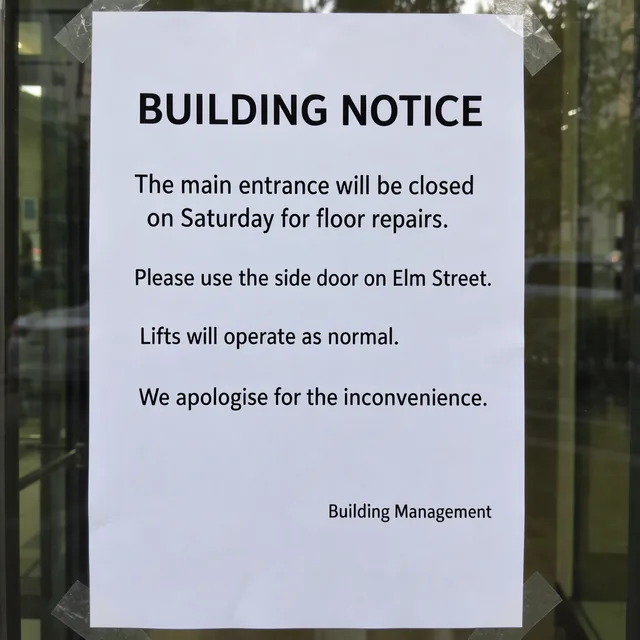
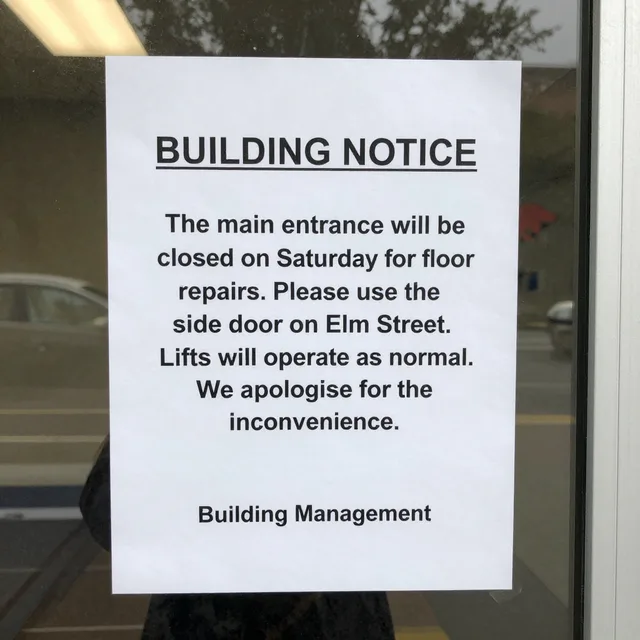
Both models handled short and medium text well, and the difference was smaller than the benchmark suggests. MOSS was more literal about layout: it kept the hierarchy the prompts described, such as a right-aligned signature, small field labels and a subtitle under the title. Z-Image Turbo tended to make every line larger and bolder. On the one photo prompt, both produced usable results. Community testers have generally found Z-Image Turbo stronger on photorealism.
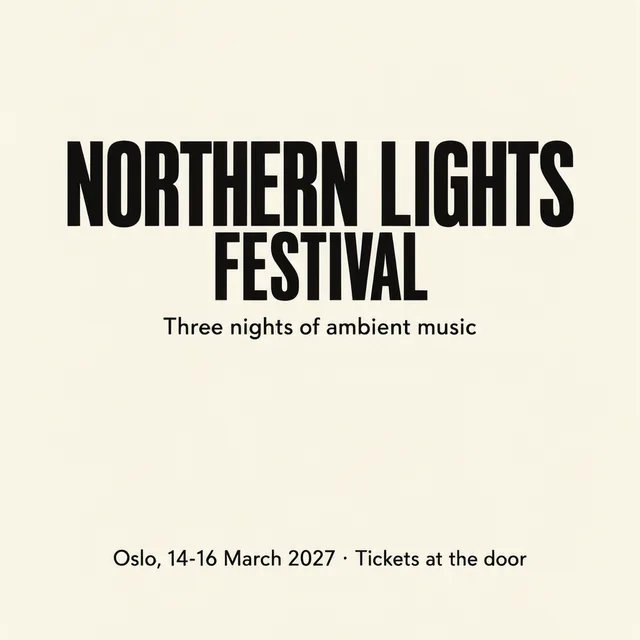
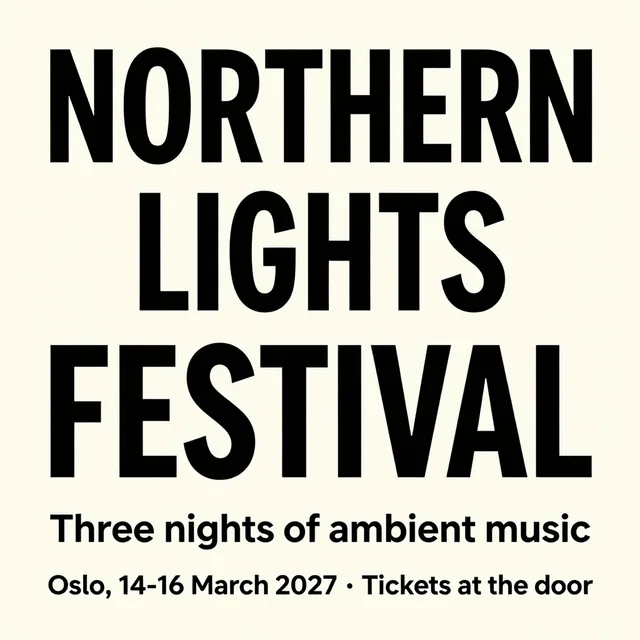
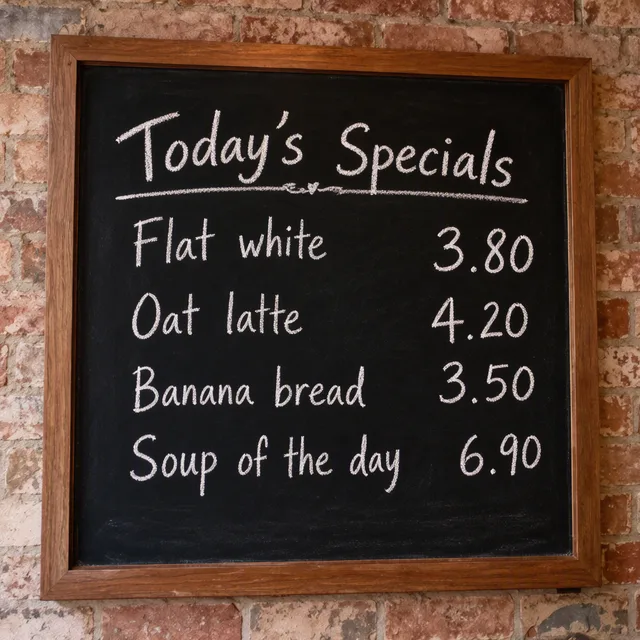
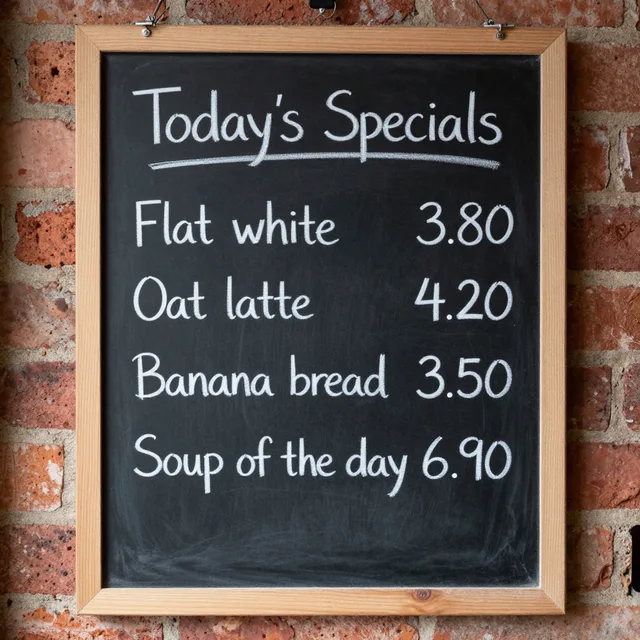


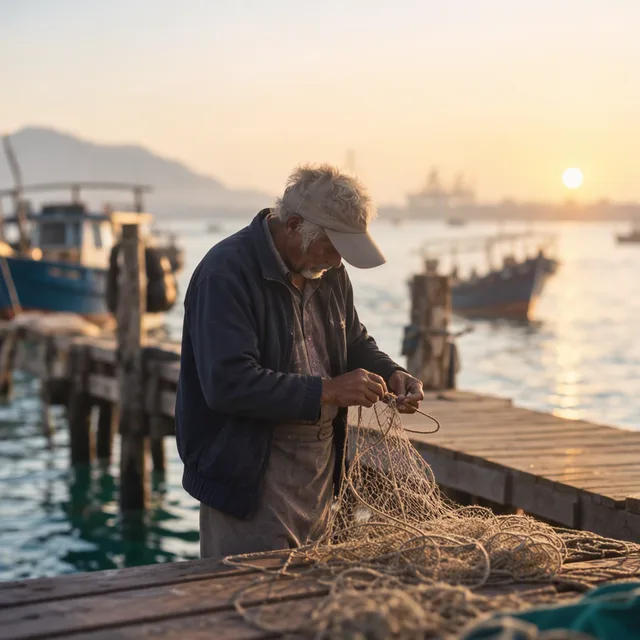
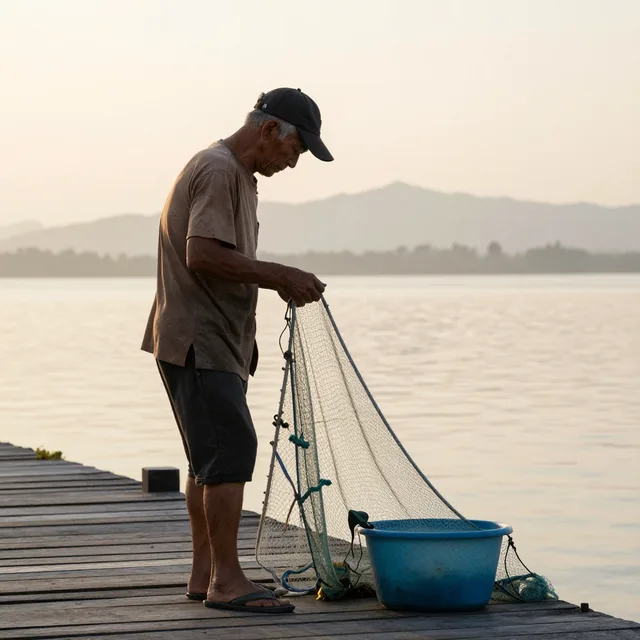
Ten prompts aren't enough to rank the two. The test does show where MOSS-Image is worth its tenfold speed cost: dense copy, Chinese text, and layouts you want to pin down with bounding boxes.
Known issues
- Vertical banding on SFT. Reported by several users; community de-banding LoRAs exist.
- Soft backgrounds. An open GitHub issue traces blurred backgrounds on SFT to attention outputs in the later blocks.
- ComfyUI sampling. On the native path, some users get pure noise with the SD3 sampling node and switch to the Flux or AuraFlow node or the official template.
- Apple silicon. Experimental. OpenMOSS validated SFT only on an M1 Max with 32 GB, at about 5 minutes per 1024² image at 20 steps.
- Anime and stylised art. Early testers rate it well below its photoreal output.
LoRA training
Train on Base and generate on SFT. OpenMOSS gives one firm rule: keep the text encoder frozen. DiffSynth-Studio supports full fine-tuning and LoRA for both checkpoints, and KohakuMossTrainer supports LoRA and LyCORIS and exports ComfyUI-format files. Neither OpenMOSS nor the trainers publish recommended rank, learning rate or dataset size yet.
Licence
Weights and code are Apache-2.0, so commercial use, hosting and fine-tuning are allowed with no revenue limits, as long as you keep the licence and notices. The bundled Qwen3.5-9B encoder and the FLUX.2-klein-4B VAE it's based on are also Apache-2.0. The paper is CC BY 4.0.
Can I use it on Windpaint?
Not yet. For text in images today, Z-Image Turbo handled most of our test prompts in under 2 seconds, and our Z-Image Turbo prompt guide covers getting text right. Every model you can call through the API is on the image generation page.
Sources
- MOSS-Image-SFT model card
- MOSS-Image-Base model card
- MOSS-Image repository and README
- MOSS-Image user guide
- MOSS-Image technical report (arXiv 2610.23374)
- Comfy-Org/MOSS-Image weights
- vLLM-Omni recipe for MOSS-Image
- SGLang cookbook: MOSS-Image
- TokenWatt: MOSS-Image GPU cost, 50 vs 4 steps
- RTX 3060 test of MOSS-Image SFT (Japanese)
Questions.
Is MOSS-Image open source?
Yes. The weights and code for MOSS-Image-Base and MOSS-Image-SFT are released under Apache-2.0, which allows commercial use, hosting and fine-tuning.
How much VRAM does MOSS-Image need?
About 29 GiB at 1024 x 1024 with everything on the GPU in bf16, which we measured on an H100. With an 8-bit or 4-bit text encoder it fits in roughly 18 to 22 GB, and offload modes run it on 12 GB cards at a large speed cost. The README's 3.65 GiB figure uses the low-memory mode that keeps most of the model in system RAM.
How fast is MOSS-Image?
17.4 seconds per 1024 x 1024 image on an H100 at the default 50 steps with CFG, and 38.7 seconds at 1456 x 1456. Community 4- and 8-step LoRAs bring that down to a few seconds, with some loss in text accuracy at the lowest step counts.
What is the difference between MOSS-Image-Base and MOSS-Image-SFT?
Base is the pretrained model without post-training, intended for LoRA training and fine-tuning. SFT is fine-tuned from Base on curated data and is the checkpoint OpenMOSS recommends for generating images.
Can MOSS-Image edit images?
Not officially. It's a text-to-image model with no reference-image input; OpenMOSS lists editing as future work. An edit LoRA ships with Comfy's repackaged weights, but OpenMOSS doesn't document it.