Wan 2.2 image-to-video prompting: camera motion, settings and examples
A Wan 2.2 image-to-video prompt should describe motion, not the picture: one camera move, what the subject does, and some ambient movement, in under 100 words. The start frame already fixes what's in the shot, and the Wan team's own rewrite instructions strip out static description for exactly that reason.
How the Wan team prompts image-to-video
Wan2.2-I2V-A14B takes a start image and a text prompt and generates a clip that begins from that image. The Wan team recommends prompt extension, rewriting your prompt with an LLM before generation, and publishes the instructions it uses in system_prompt.py. Those instructions are the best guide to what the model was tuned to read. For image-to-video, the English version tells the rewriter to:
- Describe dynamic content only, and remove static details that are already visible in the image.
- Keep the subject's actions from the original prompt, and simplify and emphasise the main subject.
- Keep and emphasise any camera movement the user asked for.
- If only an action is given ("dancing"), infer the subject from the image ("a girl is dancing").
- Condense an over-long prompt to its motion; add plausible motion to one that's too short.
- Write in English, at 100 words or less.
Its example outputs are short and literal:
The camera pulls back to show two foreign men walking up the stairs.A black squirrel focuses on eating, occasionally looking around.A woman wearing a pearl necklace looks to the right and speaks.For the rewriting itself, the README suggests qwen-vl-max through Dashscope, or a local Qwen2.5-VL-7B-Instruct or Qwen2.5-VL-3B-Instruct, since the rewriter needs to see the image. It also notes the model can generate from the image alone: pass an empty prompt with prompt extension on and the VL model writes one from the frame.
A Wan 2.2 I2V prompt structure
Three parts, in this order, cover nearly every clip:
- Camera. One move, or "static shot". "Slow push in." "The camera orbits left around her."
- Subject motion. Clear verbs and a speed: "she slowly turns her head toward the window", "the dog shakes water off its fur".
- Ambient motion. Small movement in the scene: steam rising, leaves drifting, rain falling, curtains moving in a breeze, light flickering.
Slow push in. The fisherman pulls the net across his lap with both hands.Fog drifts slowly over the water behind him.Two rules make the biggest difference. Use one camera move per clip: a 5 second clip has no room for "pan left, then zoom in, then tilt up". And keep motion modest: gentle, continuous movement usually holds up better than fast or complex action, which is more likely to blur or distort.
Wan 2.2 camera movement prompts
The official rewrite instructions quote moves like "the camera pans up" and "the camera moves from left to right". Windpaint's prompting docs list film terms the model tends to follow; state the move as a plain phrase at the start of the prompt:
| Term | What the camera does | Good for |
|---|---|---|
static shot, locked-off camera | Doesn't move; only the subject and scene do | Portraits, product details, living photos |
slow push in, dolly in | Moves toward the subject | Adding focus or tension |
pull back, dolly out | Moves away and reveals more | Reveals, endings |
pan left / pan right | Turns horizontally from a fixed point | Landscapes, wide interiors |
tilt up / tilt down | Turns vertically from a fixed point | Tall subjects, buildings |
tracking shot | Follows a moving subject | Walking, riding, vehicles |
orbit around the subject | Circles the subject | Products, characters, sculptures |
crane up | Rises, often tilting down | Establishing shots, reveals |
handheld | Small, natural shake | Documentary feel |
Pick moves the frame can support. An orbit needs a subject with some depth around it; a push in needs something to push toward; a pan needs scene beyond the edges of the frame for the model to invent. A tight close-up with a flat background is a static shot or a slow push in.
Coming soon: Windpaint will have five ready-made motion presets for Wan 2.2 I2V, each a published prompt template you apply with one field:
| Preset | Motion |
|---|---|
dolly-push-in | The camera glides slowly toward the subject. |
orbit-subject | A smooth arc around the subject with background parallax. |
living-photo | Locked-off camera with subtle ambient motion. |
product-turntable | The product turns slowly in place. |
crane-up-reveal | The camera rises and tilts down to reveal the scene. |
Choosing the start frame
The frame decides most of the result, so it's worth more effort than the prompt.
- Match the shape. In the official code,
--sizesets the pixel area and the clip's aspect ratio follows the input image. On Windpaint (coming soon) the clip's shape will come fromaspect_ratio, so send the ratio the frame was made at. - Leave room for the motion. Space in front of a subject that will walk, sky above a crane up, background depth for an orbit or a push in.
- Stay consistent with the frame. Don't ask for things that aren't there ("a second person walks in") or changes the frame can't support ("she's now wearing a red dress"). Large changes tend to make faces and objects drift from the start frame. For a different scene, make a different frame.
- Use a clean image. The clip starts from it, so blur, compression artifacts or a malformed hand in the frame start the clip too. On Windpaint the frame will be able to be PNG, JPEG or WebP up to 20 MiB.
A good way to get frames is to generate them. Text-to-image prompting has different rules from motion prompting: you describe the full scene, lighting and medium. The Z-Image Turbo page covers that model, which Windpaint serves for text to image today; generate the still at the same aspect ratio you'll use for the clip.
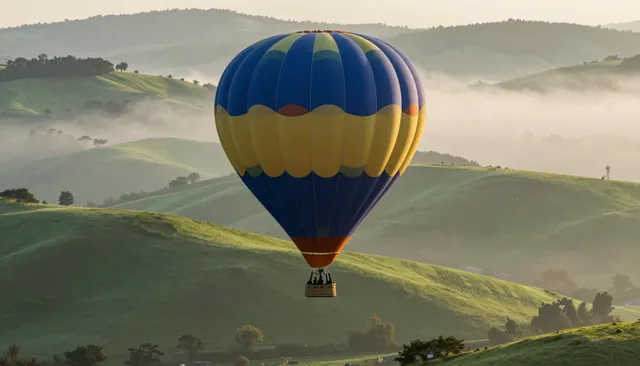
A hot air balloon rising over misty green hills at dawn, cinematic photography
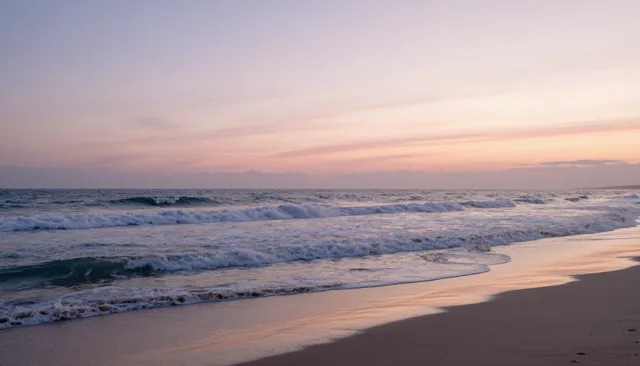
Waves rolling onto a pastel beach at sunset, wide view, cinematic photography
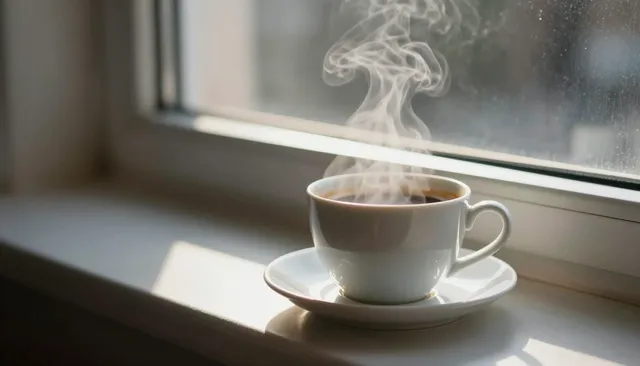
Close-up of steam rising from a cup of coffee on a sunny windowsill, cinematic photography
Wan 2.2 I2V settings: resolution, length and fps
From the official repo, for running I2V-A14B yourself:
| Setting | Value | Source |
|---|---|---|
| Sizes | 1280*720, 720*1280 (720P); 832*480, 480*832 (480P). Nothing else is accepted. | |
| Frames | 81 by default; the count should be 4n+1 | |
| Frame rate | 16 fps, so 81 frames is about 5 seconds | |
| Sampling steps | 40 | |
| Guidance scale | 3.5 for both the high-noise and low-noise experts | |
| Sample shift | 5.0 | |
| Expert switch boundary | 0.900 | |
| Text length | 512 tokens (umT5-XXL encoder) |
The Diffusers example uses the same values: max_area 480 × 832 with height and width derived from the input image's aspect ratio, num_frames=81, guidance_scale=3.5, num_inference_steps=40, exported at 16 fps.
A14B is a mixture-of-experts model: a high-noise expert handles the early steps (overall layout) and a low-noise expert the later ones (detail), each about 14B parameters, 27B in total with 14B active per step. That's why the config has two guidance values and a boundary where it switches between them.
Negative prompt
The shared config ships a default negative prompt in Chinese. Its terms cover oversaturated colours, overexposure, static or motionless frames, blurry detail, subtitles, overall greyness, low quality, JPEG artifacts, extra or fused fingers, badly drawn hands and faces, deformed limbs, messy backgrounds, many people in the background, and walking backwards. Self-hosted pipelines use it unless you replace it. Windpaint has no negative prompt field, so describe the motion you want in positive terms.
Wan 2.2 I2V VRAM for self-hosting
The README gives one figure for I2V-A14B: its single-GPU 720P command, with model offloading and dtype conversion on, "can run on a GPU with at least 80GB VRAM".
python generate.py --task i2v-A14B --size 1280*720 \ --ckpt_dir ./Wan2.2-I2V-A14B --offload_model True --convert_model_dtype \ --image examples/i2v_input.JPG --prompt "..."| Setup | Developer's figure |
|---|---|
I2V-A14B, one GPU, 720P, --offload_model True --convert_model_dtype | At least 80 GB VRAM |
| I2V-A14B, multi-GPU | FSDP plus DeepSpeed Ulysses; the official example runs on 8 GPUs |
TI2V-5B (the smaller text and image to video model), one GPU, with offload, dtype conversion and --t5_cpu | At least 24 GB VRAM, for example an RTX 4090 |
For out-of-memory errors the README suggests --offload_model True, --convert_model_dtype and --t5_cpu. It doesn't give a separate text figure for 480P; its per-GPU timing and memory table is published as an image. Diffusers-format weights are published as Wan-AI/Wan2.2-I2V-A14B-Diffusers, and that card lists ComfyUI integration as done.
TI2V-5B runs at 720P (1280 × 704) and 24 fps and is a different model, not a smaller copy of I2V-A14B; see Wan 2.2 TI2V 5B. Hardware requirements compares the published VRAM of every model in the catalogue.
Common failure modes
| Problem | Likely cause | What to try |
|---|---|---|
| Face or product drifts from the frame | The prompt asks for large changes | Ask only for motion the frame supports; make a new frame for a new look. |
| Smeared or blurry action | Too much motion for 5 seconds | Slow it down: "slowly", "gently", one action instead of three. |
| Camera ignores the move | Several moves, or the move buried at the end | One move, stated first: "Slow push in." |
| Little or no motion | The prompt restates the scene | Cut static description; add verbs for subject and ambient motion. |
| Subject cropped or framed oddly | Clip aspect ratio doesn't match the frame | Use the frame's ratio for the clip. |
| New objects appear | Prompt mentions things not in the frame | Describe only what's there, or put it in the frame first. |
Wan 2.2 I2V prompt examples
| Start frame | Prompt |
|---|---|
| Product on a slate tile | Static shot. The bottle turns slowly in place on the tile. Water droplets catch the light as it rotates. |
| Portrait by a window | Static shot. He blinks, then slowly turns his head toward the window and smiles slightly. Dust drifts in the light. |
| Lighthouse on rocks | Slow crane up. The camera rises over the rocks and tilts down toward the lighthouse as waves break below. |
| Cyclist on a wet street | Tracking shot following the cyclist from the side. Her coat moves in the wind, reflections ripple in the puddles. |
| Bowl of ramen, overhead | Slow push in. Steam rises from the bowl and curls to the right. The broth's surface shimmers slightly. |
| Character in a garden | Orbit around the subject. Her hair and scarf move in a light wind. Petals drift past the camera. |
| Mountain valley | Slow pan right across the valley. Clouds move across the sky and their shadows pass over the hills. |
Each is under 30 words, names one camera move first, and spends the rest on motion. If a clip has an artifact you don't like, try another seed before you rewrite the prompt.
Wan 2.7, Animate, S2V and VACE: which Wan for which job
Wan 2.2 I2V animates a still from a text prompt. Other Wan models cover jobs it doesn't, and one of the newer names isn't downloadable at all.
| Model | What it does | Open weights |
|---|---|---|
| Wan 2.7 | Alibaba's 2026 image and video models, 2 to 15 second clips plus video editing | No, API-only on Alibaba Cloud |
| Wan2.2-Animate-14B | Animates a character image with the motion of a driving video, or swaps the character into that video | Yes, Apache 2.0 |
| Wan2.2-Animate-2-14B | Newer Animate: works from the driving video without a pose extractor and adds text-driven viewpoint control | Yes, Apache 2.0 |
| Wan2.2-S2V-14B | Speech to video: audio drives the clip, from a reference image and optional prompt or pose video, at 480p or 720p | Yes, Apache 2.0 |
| Wan2.1-VACE (1.3B, 14B) | One model for reference-to-video, video-to-video and masked editing, with depth, pose and mask conditions | Yes, Apache 2.0 |
The prompting advice above carries over to Animate and S2V: the reference image and the driving video or audio fix most of the clip, so the prompt only needs the camera and any motion the inputs don't supply. The S2V card says its single-GPU command needs at least 80 GB of VRAM. ComfyUI has official workflows for Wan Animate and VACE. We haven't confirmed an official Wan 2.2 version of VACE from the Wan team, so the table lists the 2.1 release.
Calling Wan 2.2 I2V through the Windpaint API (coming soon)
Windpaint will serve the model as wan-2.2-i2v behind video.generate: one start frame, a prompt, and back comes a 5 second MP4 at 480p with no audio. The start frame can be an asset id from an earlier job or upload, a public https:// URL or a data: URI (PNG, JPEG or WebP, up to 20 MiB):
curl -X POST https://api.windpaint.ai/v1/generation/capabilities/video.generate \ -H "Authorization: Bearer $WINDPAINT_API_KEY" \ -H "Content-Type: application/json" \ -d '{ "model": "wan-2.2-i2v", "prompt": "Slow push in. Steam rises from the bowl and curls to the right.", "inputs": {"start_frame": ["https://example.com/ramen.jpg"]}, "aspect_ratio": "4:5", "seed": 3, "webhook_url": "https://example.com/hooks/windpaint" }'The clip's shape comes from aspect_ratio (default 16:9, giving 848 × 480; 4:5 gives 480 × 608), not from the frame, so match it to the image. A clip takes several minutes, so pass a webhook_url or poll the returned status_url with backoff; Prefer: wait caps at 60 seconds and rarely helps for video. When it completes, the clip is in video and outputs[0].
With a motion preset the prompt is optional: send "preset": "orbit-subject" with the start frame and the template's camera instructions are used on their own. A clip will cost 4 credits ($0.20), and failed or refused clips won't be charged. Start frames, sizes and errors are in the video docs, and the image-to-video pipeline recipe chains a generated still into a clip.
Sources
- Wan2.2 repository and README
- Wan2.2-I2V-A14B model card
- Wan2.2-I2V-A14B Diffusers card
- Wan2.2 prompt-extension system prompts
- Wan2.2 I2V-A14B config
- Wan2.2 shared config
- Wan2.2 accepted sizes
- Wan2.2 generate.py
- Windpaint docs: Prompting
- Windpaint docs: Video
- Windpaint docs: Presets
- Alibaba Cloud: Wan 2.7 launch
- Wan2.2-Animate-14B model card
- Wan2.2-Animate-2-14B model card
- Wan2.2-S2V-14B model card
- Wan2.1-VACE-14B model card
- ComfyUI docs: Wan 2.2 Animate
- ComfyUI docs: Wan VACE
Questions.
How do I prompt Wan 2.2 image to video?
Describe motion rather than the scene: one camera move, what the subject does, and small ambient movement. The Wan team's own rewrite instructions remove static details already visible in the image, keep camera moves and subject actions, and stay under 100 words.
What resolution does Wan 2.2 I2V support?
480P and 720P. The official config accepts 1280*720, 720*1280, 832*480 and 480*832. For image-to-video the size sets the pixel area and the aspect ratio follows the input image.
How long are Wan 2.2 I2V videos?
The official config defaults to 81 frames at 16 fps, about 5 seconds. The frame count should be 4n+1.
How much VRAM does Wan 2.2 I2V need?
The official README says its single-GPU 720P command, with model offloading and dtype conversion on, can run on a GPU with at least 80GB of VRAM. It also documents multi-GPU inference with an 8-GPU example.
What are the recommended Wan 2.2 I2V settings?
The official I2V-A14B config uses 40 sampling steps, guidance scale 3.5 for both experts, sample shift 5.0 and an expert switch boundary of 0.900, with 81 frames at 16 fps.
Does Wan 2.2 I2V need a prompt?
Not strictly. The README says the model can generate from the input image alone, and its example uses an empty prompt with prompt extension so a vision-language model writes one from the image.
Does Wan 2.2 I2V use a negative prompt?
The official config ships a default negative prompt in Chinese covering oversaturation, static frames, blur, subtitles, low quality, JPEG artifacts, malformed hands and faces, messy backgrounds and walking backwards.
Is there a Wan 2.7 image-to-video model I can download?
No. As of November 2026 Wan 2.7 is API-only on Alibaba Cloud. The newest open-weight Wan image-to-video model is Wan 2.2 I2V-A14B.
What is Wan 2.2 Animate?
An open Wan model that animates a character image using the motion from a driving video, or replaces the character in that video. It's 14B and Apache 2.0.